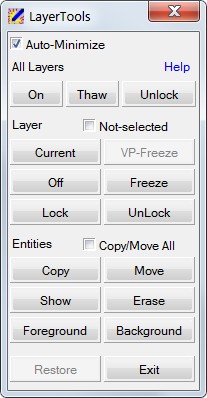
LayerTools


Dialog to manage drawing layers based on contained entities
|
Command: LayerTools, ddlTools |
The LayerTools command opens a small "modeless" (or "parallel") dialog, to provide a set of layer handling functions designed for fast and comfortable layer control, based on selected entities to determine target layers to be effected.
|
Compared to numerous similar layer management tools, the LayerTools provide a number of advanced functionalities like Reverse Selection, Nested Selection, and Layer Restore, as well as a comfortable user interface with some nice features like Auto-Minimize and Mouse Tracking. Please see General Hints for some more details regarding LayerTools' special features. All functions and features are documented in detail under Using LayerTools. |
In addition, one of the next BcadTools Freeware version will provide extra toolbars for LayerTools functions - to match personal taste as best as possible.